

How Does sensAI Work? A Step-by-Step Guide to the AI-Powered YouTube Video Quiz Generator
What if turning a YouTube lesson into an interactive quiz took less time than making a cup of coffee? With sensAI Kung Fu Quiz's built-in AI-powered YouTube video quiz generator, teachers can paste a YouTube link and get a ready-to-use video quiz within minutes.
Instead of rewatching videos, pausing at key moments, and writing questions manually, let sensAI handle the video quiz creation process. Questions are generated from the YouTube video's content and placed at relevant timestamps throughout the video, helping you create a perfect video lesson in minutes. This guide shows you exactly how sensAI works and how to get started for free.
Before You Start: What sensAI Needs to Generate a Quiz
Before creating your first AI-powered quiz in Kung Fu Quiz, there are a few requirements to keep in mind. sensAI works with most public YouTube videos, but make sure the YouTube video includes captions or a transcript. This allows sensAI to understand the video's content and identify important learning points.
And most educational videos already have captions. For example: Khan Academy, CrashCourse, SciShow Kids, TED-Ed, HomeSchool.asia and other subject-specific tutorial channels all work well. It delivers the best results with educational videos, tutorials, lectures and explainer content; the kinds of videos teachers already use in class. sensAI also supports multiple languages, including English, Vietnamese, Indonesian and Arabic.
To get started, all you need is a Kung Fu Quiz account. You can sign up for free in a few minutes and get 100 free AI credits to start creating quizzes with sensAI right away. Getting started is easy. Just create a free Kung Fu Quiz account and receive 100 AI credits to start creating video quizzes with sensAI.

How sensAI Works: The 3-Step Process from YouTube URL to Interactive Quiz
The entire AI quiz generation in Kung Fu Quiz is designed to be fast and teacher-friendly. Here's the full process, in just 3 easy steps.
- Step 1: Paste Your YouTube URL into Kung Fu Quiz
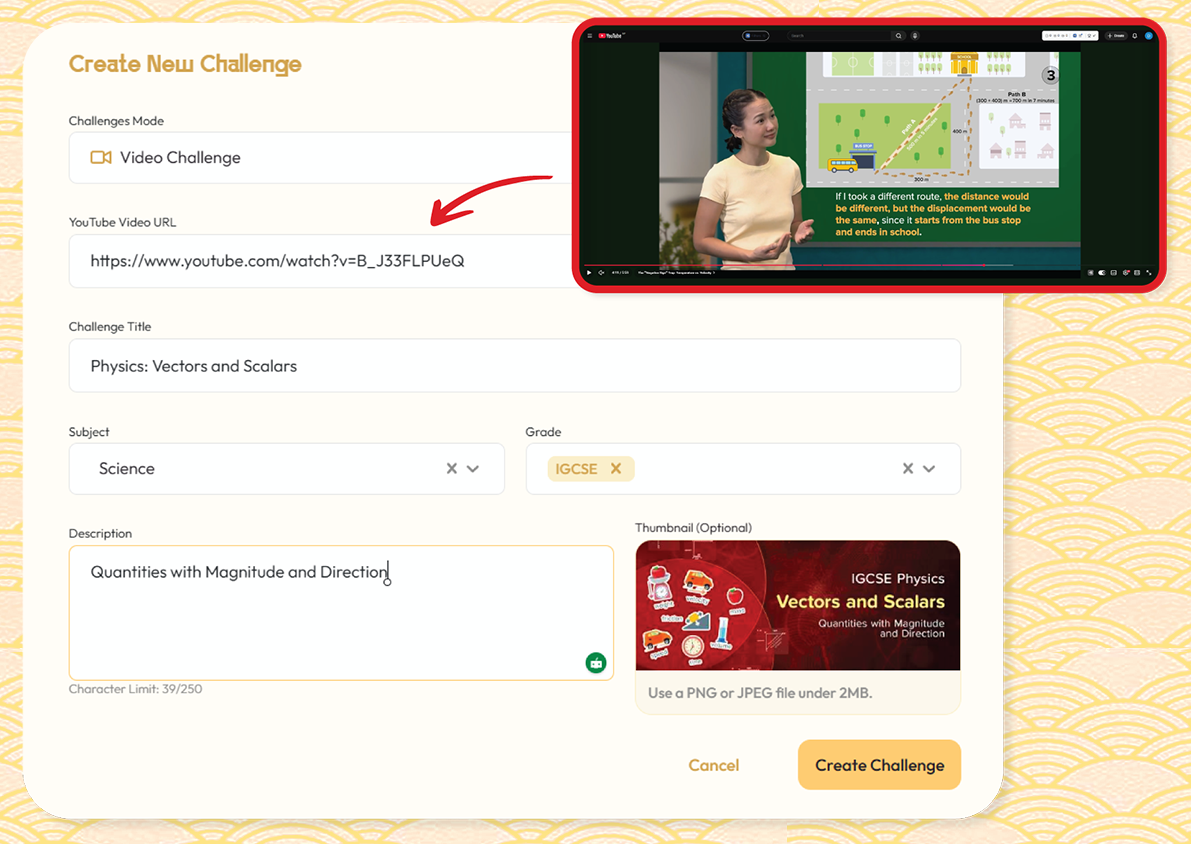
The first step of generating a video quiz with sensAI is creating a Video Challenge inside Kung Fu Quiz.
- Login to your Kung Fu Quiz Account.
- Click on the "Video Challenge" card.
- Paste the YouTube video link.
Any public YouTube video works, just ensure the videos have clear audio and transcripts. You can use videos from: Khan Academy, CrashCourse, SciShow Kids or any other subject-specific channels.
- Fill in the required details and Click on "Create Challenge".
Pro Tip: Create your own video lesson with NotebookLM, upload it to YouTube as an unlisted video and paste the link into Kung Fu Quiz to create more personalised video quizzes with sensAI.
- Step 2: sensAI Analyses the Video and Generates Questions
Once the YouTube video is added to Kung Fu Quiz, sensAI analyzes the video content and automatically generates and embeds relevant questions at appropriate timestamps throughout the video to create an interactive Video Quiz.
- Transcript Extraction: First, sensAI reads the video's captions or transcript. It doesn't just scan through it, it processes the full text to understand what is being taught, discussed, or explained throughout the video.
- Key Concept Identification: Next, the AI identifies the most important concepts and topics from the transcribed texts, helping generate the most relevant questions.
- Timestamp Mapping: After identifying important concepts, sensAI maps those concepts to specific points in the video. This is an important difference from other quiz generators. Questions are embedded directly in the timestamps where concepts are introduced or explained. This saves teachers from manually deciding where questions should appear and helps ensure assessments are aligned with the lesson content.
- Question Generation: Finally, sensAI generates both single-answer and multiple-answer questions, each aligned to the identified concepts and relevant learning points from the lesson. And most importantly, the questions are embedded directly inside the video.
This automated quiz generation from video content and the timestamp placement is what saves teachers the most time and makes students actually engage with the material.
- Step 3: Review, Customise, and Share with Students
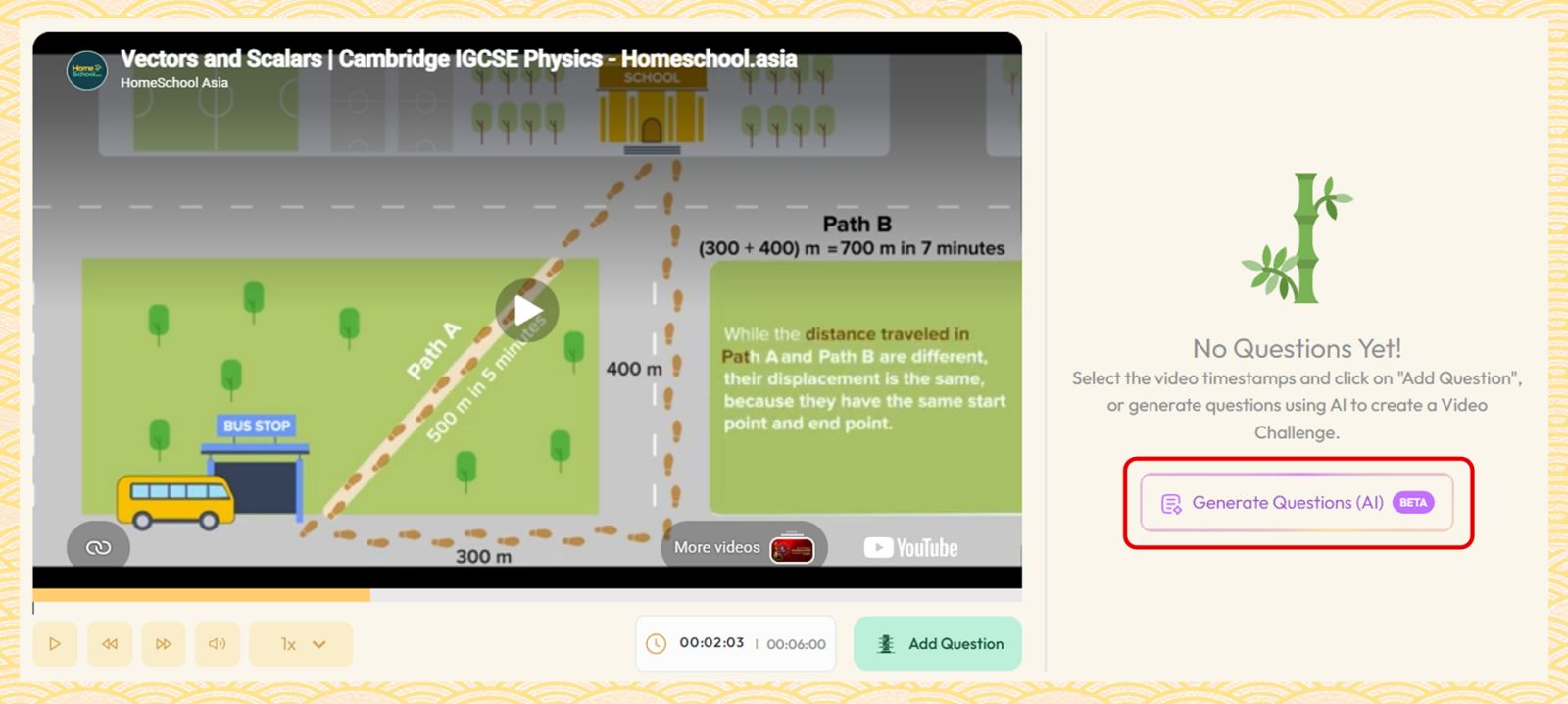
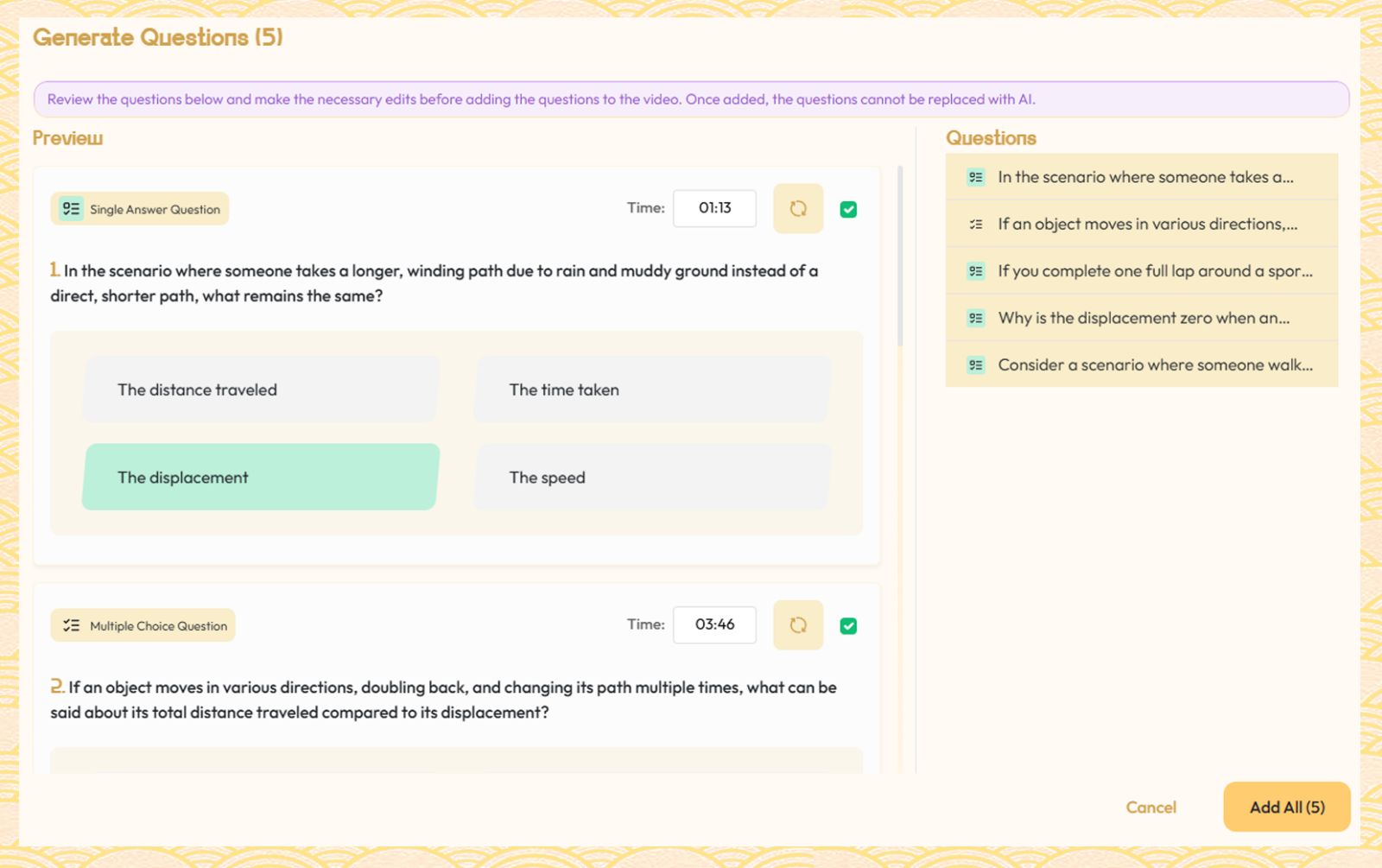
Once the questions are generated, you will see all the AI-generated questions on a review screen before sharing them with your students. This preview allows you to verify accuracy and relevance by giving you the opportunity to:
- Remove or replace any questions that don't fit your teaching goals.
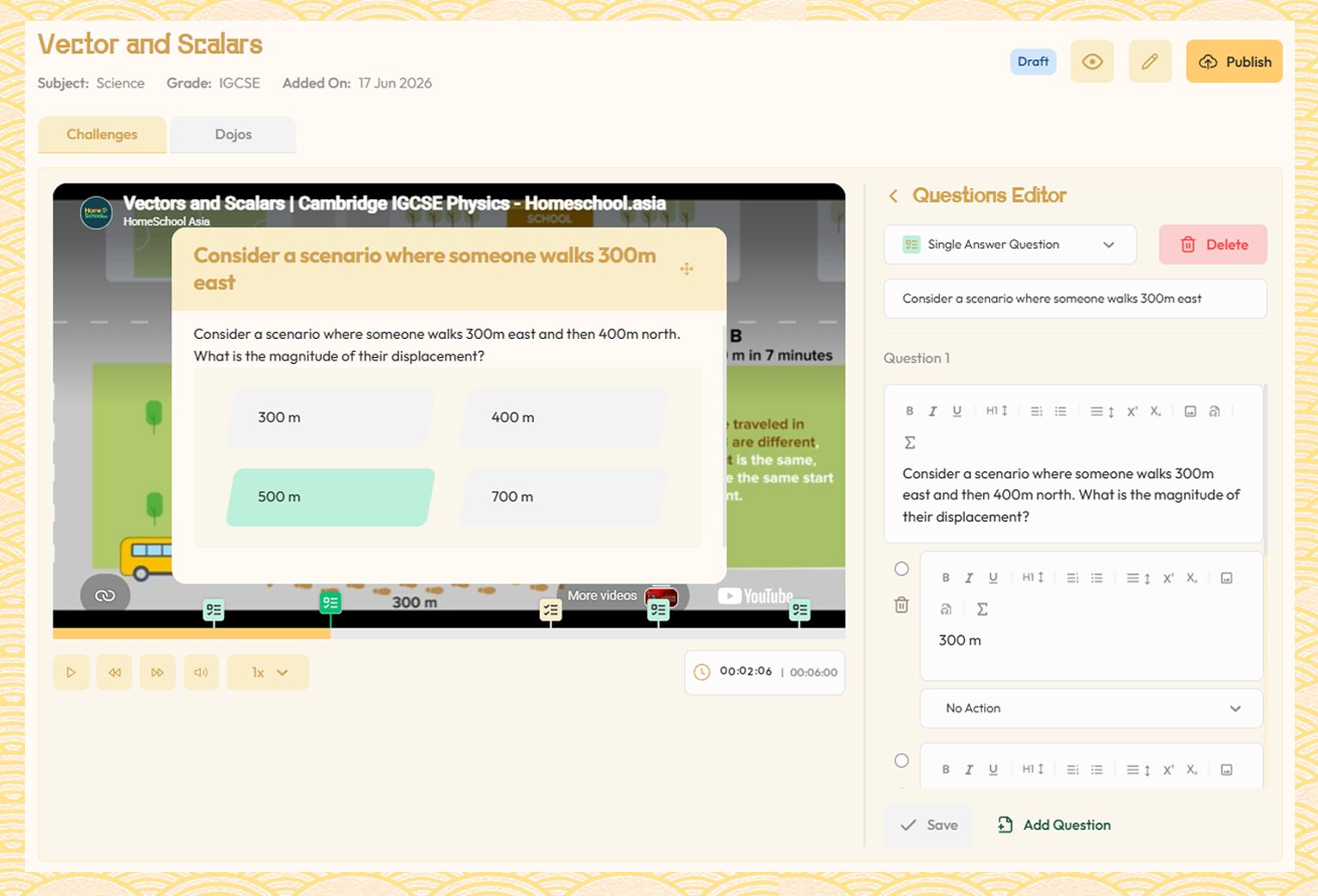
- After this, you can further refine your quiz by clicking on “Add questions.”
- Edit the question wording to better suit your teaching style.
- Add your own custom questions to strengthen specific learning objectives.
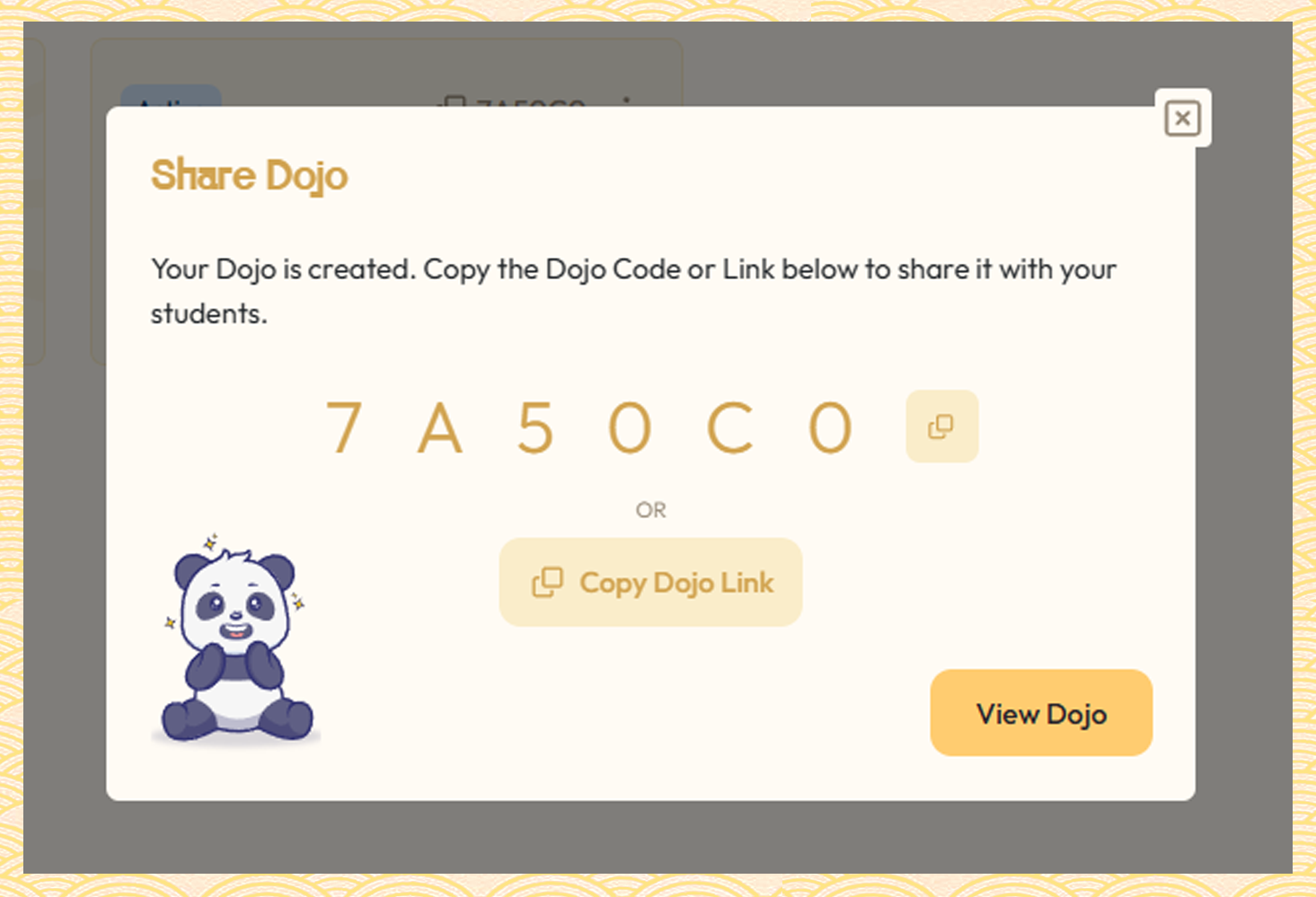
After reviewing the quiz, you can publish and share the quiz with students via a direct link or a Dojo Code. Teachers can also choose from different learning experiences using one of three Dojo Modes:
- Game Mode: A competitive, score-based quiz mode where students compete on leaderboards for a fun, engaging game experience.
- Assessment Mode: A structured quiz mode where teachers receive detailed quiz insights to measure student understanding and track progress.
- Feedback Mode: An interactive quiz mode where students receive immediate feedback on their answers, helping them strengthen their understanding and learn from their responses in real time.
Together, these options create a flexible interactive video assessment experience for different classroom needs.
What the Experience Looks Like for Students
From a student's perspective, taking a YouTube Video Quiz is simple and seamless. Students simply open the shared link or enter a Dojo Code. No app download is required, and no student account is needed.
As they watch the video, questions appear at relevant points in the lesson, prompting them to think about what they've just learned before moving forward. This creates a more active learning experience, helping students stay engaged and focused throughout the video.
The key difference is that the quiz becomes part of the learning experience itself. Instead of waiting until the end of a lesson to check understanding, learning, and assessment happen together in real time.
Explore a sample interactive video quiz and experience exactly what your students will see.
See It for Yourself — Try sensAI Free
Reading about sensAI is helpful, but experiencing it firsthand is even better.
Simply paste a YouTube link and watch the entire process happen in minutes. Educators around the world are already using sensAI to create interactive video lessons faster and more effectively.
If you've been wondering how sensAI works, the easiest way to find out is to create your first quiz and see the results for yourself.
Generate Your First Quiz Free
Sign up for a free Kung Fu Quiz account and receive 100 free AI credits to start creating quizzes today.

Frequently Asked Questions About How sensAI Works
How long does sensAI take to generate a quiz from a YouTube video?
Most quizzes are generated in under two minutes, depending on the video's length and the number of questions generated.
How does sensAI know where to place questions in the video?
sensAI analyses the video's transcript, identifies key concepts, and places questions at the points where those concepts are explained.
Does sensAI work with any YouTube video?
sensAI works with most public YouTube videos that have captions or transcripts. It performs best with educational content such as tutorials, lectures, and explainer videos.
What types of questions does sensAI generate?
sensAI generates single-answer and multiple-answer questions based on important concepts identified within the video's content.
Can I edit the AI-generated questions?
Yes. Teachers can review, edit, replace, or remove any generated questions before sharing the quiz with students.
Do students need an account to take a sensAI quiz?
No. Students can access quizzes through a shared link or Dojo code without creating an account.
How accurate are the AI-generated quiz questions?
The questions are generated through transcript analysis and concept identification. Results are typically highly relevant for educational videos, and teachers can review all questions before publishing.