

How to Add Quiz Questions to YouTube Videos
YouTube gives teachers access to educational videos on almost any topic, from mathematics and science to history, languages and professional training. However, assigning a video does not necessarily mean students will pay attention, understand the lesson or remember what they watched. They may skip sections, become distracted or watch without actively engaging with the content.
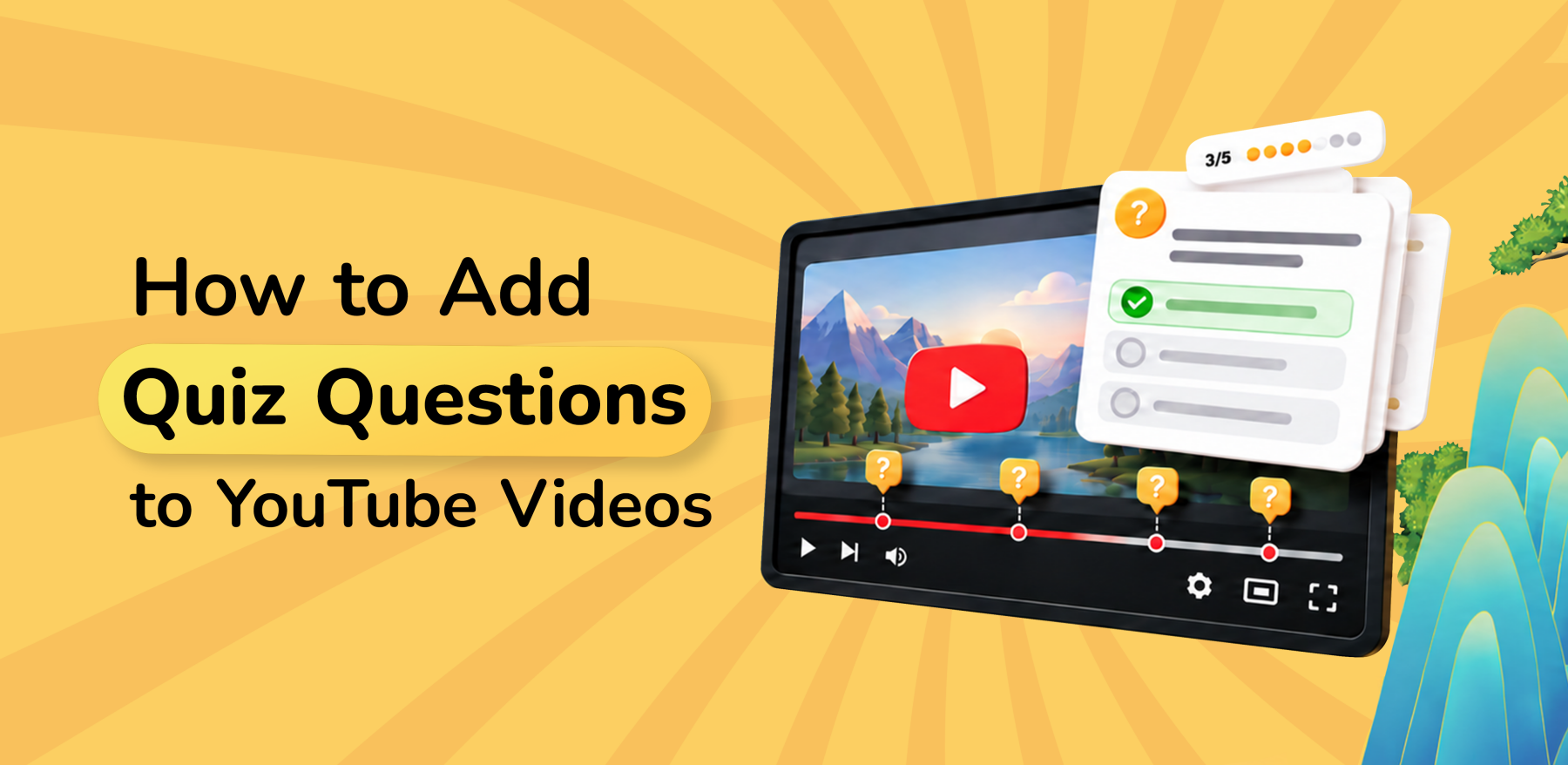
Adding questions at key moments turns a YouTube video into an interactive learning activity. Students pause to recall or apply what they have just learned, while teachers gain clearer evidence of participation and understanding.
With Kung Fu Quiz, teachers can turn any YouTube video into an interactive Video Challenge, add questions throughout the lesson and use Dojo Insights to review how students performed.
Why Add Quiz Questions to YouTube Videos?
A video may explain a concept, or introduce a new topic, but without interaction, students can easily lose focus and retain nothing. Without interaction, it can be difficult to know whether students followed the lesson or understood its key ideas.
Questions placed inside the video at purposeful points helps students:
- Stay focused on the lesson;
- Recall important information soon after learning it;
- Apply concepts before moving on; and
- Recognise areas they may need attention with.
They also give teachers more useful information than a shared video link alone. Instead of relying on whether students say they watched the video, teachers can review participation, responses and performance.
For example, during a video lesson on photosynthesis adding a question after a section explaining chlorophyll: “What is the primary role of chlorophyll in photosynthesis?” could prompt students to better recall what they just watched and apply it immediately. This turns a regular video assignment into a measurable learning activity.
Create Interactive YouTube Video Quizzes with Kung Fu Quiz
With Kung Fu Quiz, teachers can turn any public YouTube videos into interactive video quizzes. The process is simple:
Step 1: Choose Your YouTube Video
Start with an educational YouTube video that supports your learning objective. It could be a science explanation, history documentary, math tutorial, language lesson, professional training video, or flipped-classroom lesson.
Before using it, check that the video:
- Is appropriate for your students and their level;
- Explains the required concepts accurately;
- Has clear sections where questions can be added; and
- Is focused enough to support the intended lesson outcome.
The strongest starting point is not simply an interesting video, but one that helps students understand something specific.
Step 2: Create a Video Challenge
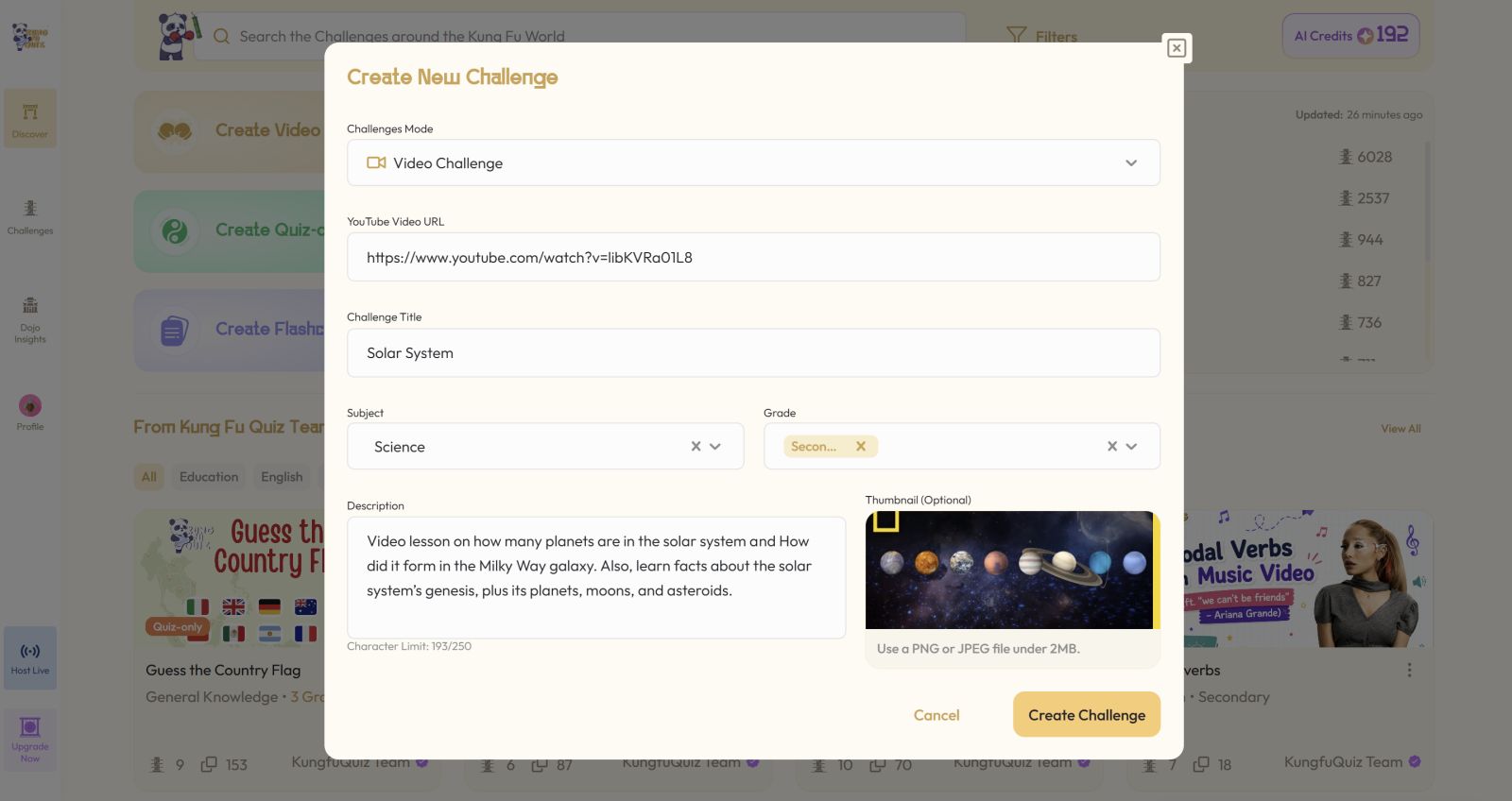
Log in to your Kung Fu Quiz Sifu account and select the Video Challenge card. Paste the YouTube video link and add the lesson details, such as its title, subject, grade, description, and click Create Challenge.
Step 3: Add Questions at Key Moments
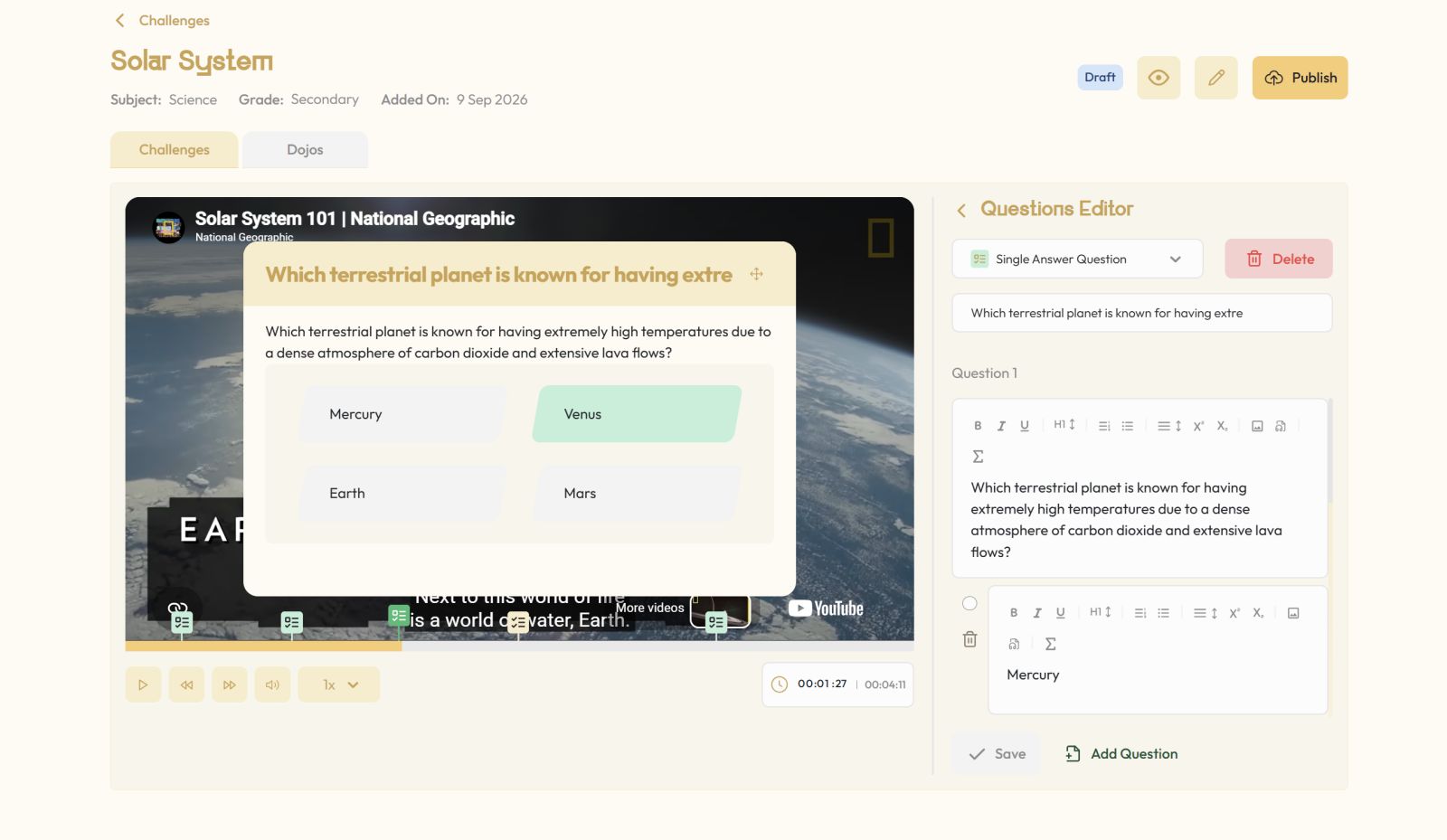
Play through the video and identify the points where students should pause, recall, interpret or apply an idea. At each relevant timestamp, select Add Question and create the question you want students to answer.
The Question Editor supports several types: Single Answer, Multiple Answer, Fill in the Blank, Drag Words into Box, Sort Sentence, and Button to redirect students to key points.
For example, for a 12-minute lesson on the solar system, you might add:
- 2:30: Single Answer question about planets
- 5:15: Multiple Answer question about gravity
- 8:00: Fill in the Blank question about Earth's orbit
- 10:30: Drag Words into Box question to check overall understanding
Placing different question types throughout the video not only adds a layer of engagement but it also lets you check understanding as the lesson develops instead of waiting until the end.
Step 4: Create a Dojo and Share It
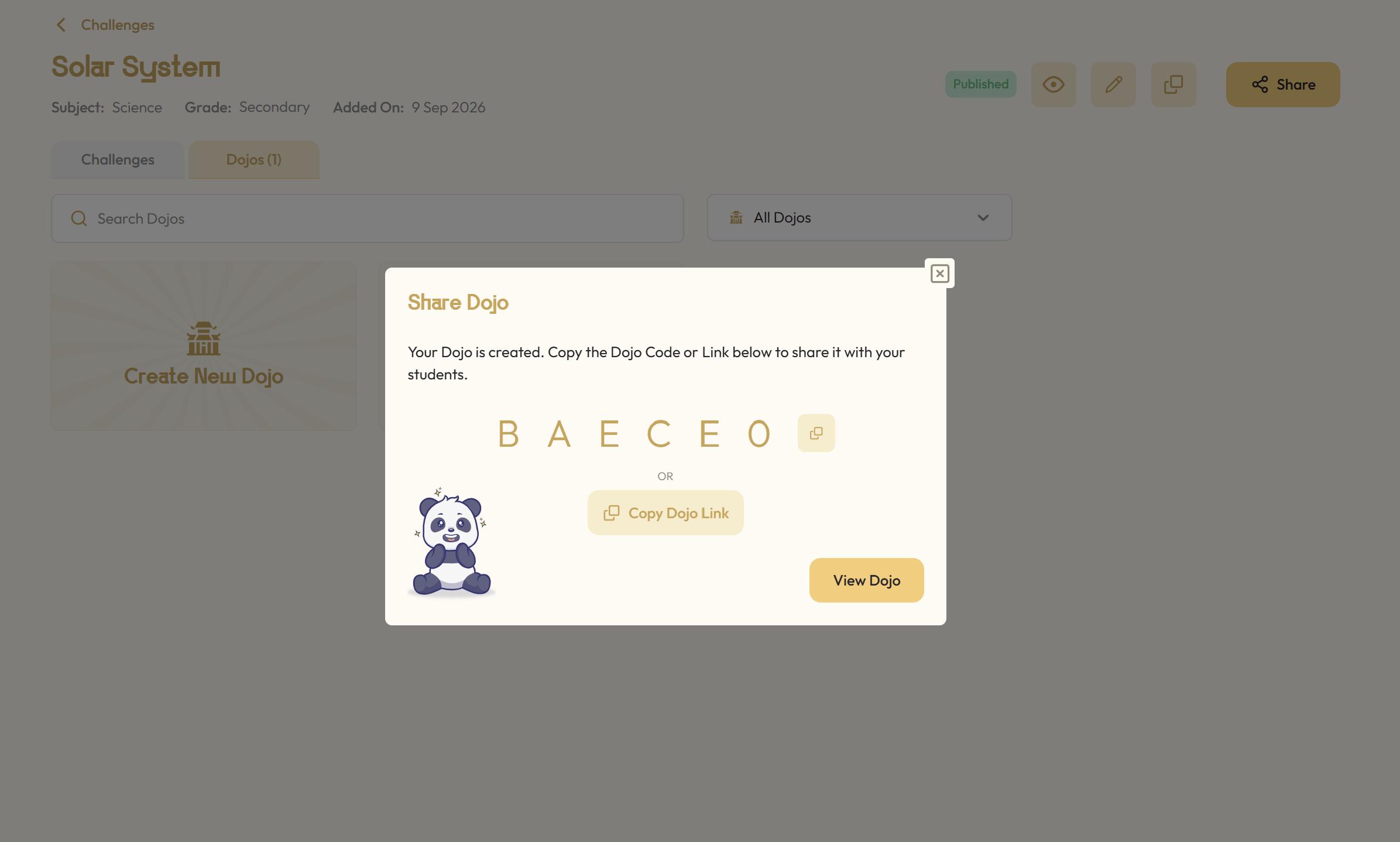
When the Video Challenge is ready, publish it in a Dojo and share the Dojo link or code with your students. They can join using their names without needing to create their own accounts.
As students watch, the video pauses at the timestamps where questions have been added. They respond and then continue with the lesson, creating a more active viewing experience.
Step 5: Review Student Performance
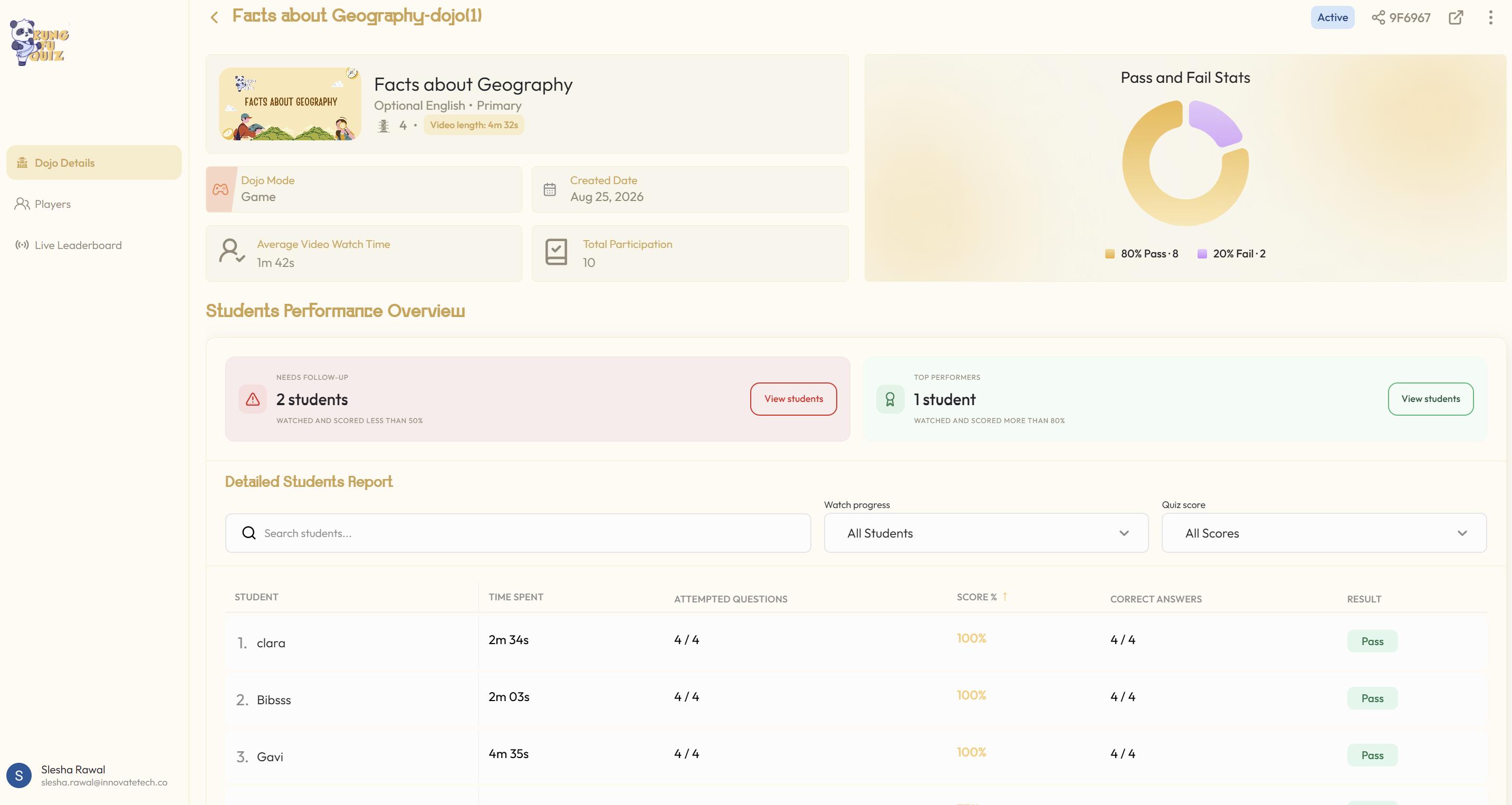
Once students complete the Challenge, open Dojo Insights to review participation and performance. Available insights depend on the specific plan your account is registered with. It may include:
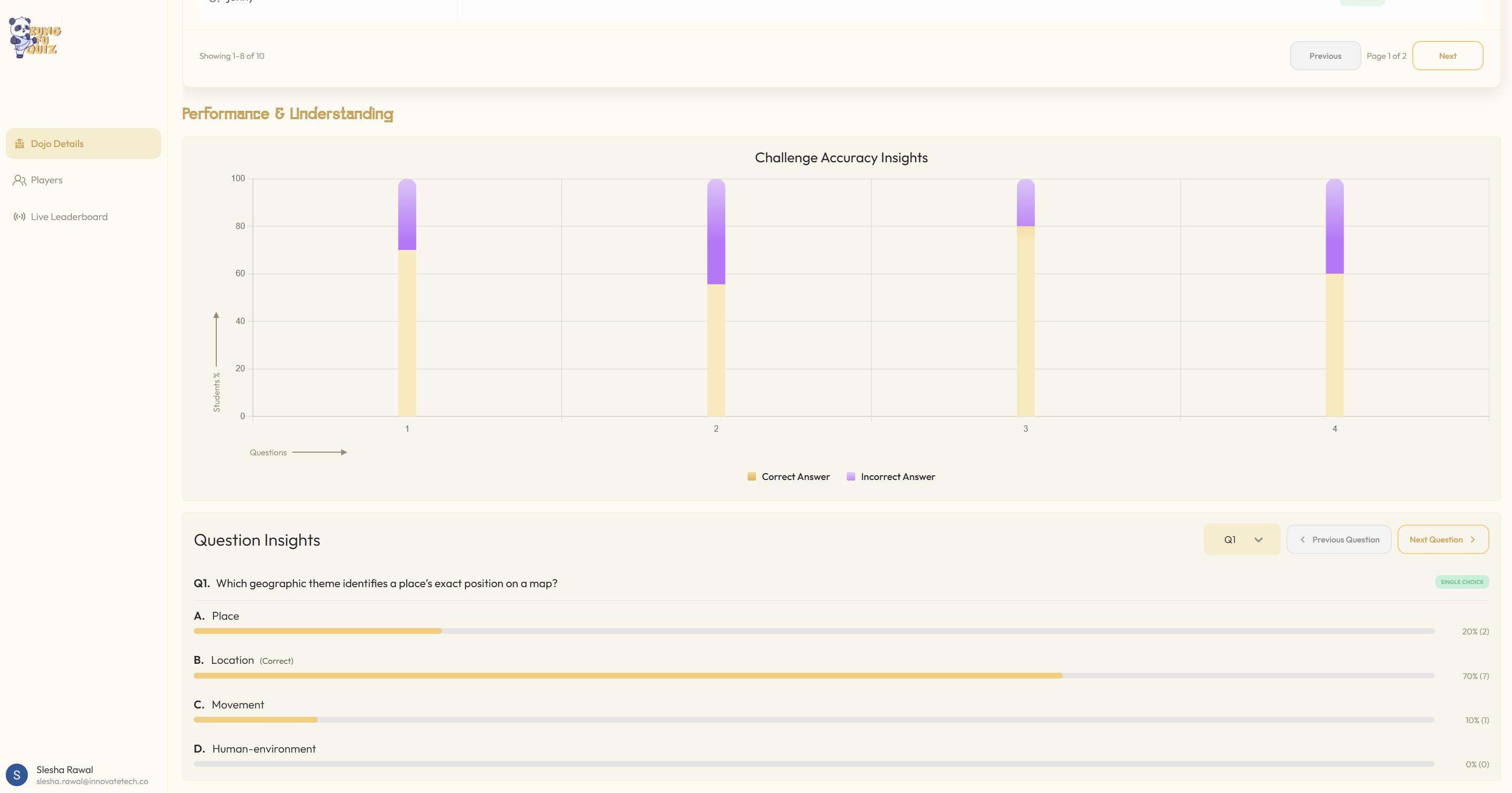
- Overall Performance: review participation, pass/fail statistics, average watch time and overall Challenge accuracy;
- Individual Student Performance: see each student's watch time, questions attempted, correct answers and responses;
- Top Performers & Students Needing Follow-Up: quickly identify students who are doing well and those who may need additional support; and
- Individual Question Insights: examine how students responded to each question and identify concepts that may need to be revisited.
This is especially useful for flipped classrooms and independent learning, where teachers need a clearer picture of student understanding without relying solely on whether students say they watched the video.

Create Video Quiz Questions Faster with sensAI
Creating questions manually can take time, especially for longer videos. That's why sensAI, Kung Fu Quiz's AI Video Quiz Generator, can help speed up the process by generating editable quiz questions based on a YouTube video's content and timestamps.
Simply add the YouTube video, choose question preferences, and let sensAI generate the questions. Then, review, edit, replace, or customisethem before assigning the quiz to the students.
The workflow is simple:
Find a video → Add it to Kung Fu Quiz → Generate with sensAI → Review → Share
sensAI speeds up question creation, but the teacher remains in control. Reviewing the generated questions ensures that they match the students' level, the lesson objective and the way the video will be used.
With the questions handled faster, teachers can spend more time focusing on lesson delivery and their students.
How to Write Good Questions for YouTube Videos
Adding questions is only useful when those questions direct attention towards meaningful learning. The following practices can make a Video Challenge more effective.
- Focus on Important Concepts: Do not test every small detail. Prioritise the knowledge and skills students need to understand by the end of the lesson. Each question should have a clear reason for being included.
- Place Questions After the Relevant Explanation: Students should encounter a question after the video has provided the information or explanation needed to answer it. Well-timed questions give students an immediate opportunity to retrieve and use what they have learned.
- Use Question Types Purposefully: Using different question types can make the experience more engaging and allow you to assess different kinds of understanding. For example:
- Use Single Answer for identifying one correct idea;
- Use Multiple Answer when several statements may be correct;
- Use Fill in the Blank for key vocabulary or precise terms;
- Use Sort Sentence for sequence or process; and
- Use Drag Words into Box for categorising or matching information.
- Avoid Overloading the Video: If you add a question every 30 seconds, you may interrupt the flow of the lesson and make the video frustrating to watch. Instead, focus on key moments where a question can reinforce an important concept or check understanding.
Turn a Video Assignment into Learning You Can Review
YouTube can be more than something students are asked to watch. With well-timed questions, it can become an active learning experience that encourages students to pay attention, retrieve information and apply key ideas.
Kung Fu Quiz brings the video, questions and performance insights together. Teachers can create questions manually or generate an editable starting point with sensAI, share the lesson through a Dojo and use Dojo Insights to decide what should happen next.
Frequently Asked Questions (FAQs)
Can I add quiz questions directly to a YouTube video?
Yes. With Kung Fu Quiz, you can add questions at selected timestamps in a public YouTube video and turn it into an interactive Video Challenge for your students.
Do I have to create all the questions myself?
No. You can create questions manually in the Question Editor or use sensAI to generate editable questions from the video. You can review, edit, replace or remove generated questions before publishing.
What types of questions can I add to a YouTube video?
Kung Fu Quiz supports multiple question types including Single Answer, Multiple Answer, Fill in the Blank, Drag Words into Box, Sort Sentence and Button questions, allowing teachers to create more varied and engaging video quizzes.
Can I see which students understood the video?
Yes. Kung Fu Quiz provides Dojo Insights to help teachers understand student participation and performance. Depending on your plan, you can access detailed insights into student and question performance.
Is Kung Fu Quiz free?
Yes. Kung Fu Quiz offers a Freemium plan which includes 100 AI credits, Video Challenges, Quiz-only Challenges, Flashcards, Live Quizzes, Dojo Insights. You can upgrade to the Defender of Education plan for features such as private publishing, detailed insights into students, questions and overall class performance, unlimited Dojo players, no Dojo expiration and additional AI credits.